Inventorying Recipes
Bruce Von Stiers
There are several software programs on the market for recipes. Some even let you make menus and keep an inventory of ingredients. A software program that I recently took a look at does all of this and more. The title of the program is CookenPro 3. The company behind this program is Barrington Software, Inc. The version of the program that I checked out is the Commercial Version. They also have a home version of the program.
This program has its foundation in the Microsoft Access database application process. With Access, you can use the Switchboard and other tools to create your own database applications. That is just what the folks at Barrington Software have done. Once upon a time, I had thought of putting together something like this myself. Time constraints and a lack of enthusiasm from my target audience, (my wife); put a kibosh on me fiddling around with designing a menu and recipe program.
The program has ten main areas. These areas are Enter A Recipe, Find A Recipe, Edit A Recipe, Import A Recipe and Export A Recipe. There is also Make Recipes WebReady, Find A Menu. Plan A Menu, Make A Cookbook and Inventory. Each of these areas can be accessed from the Main Switchboard, the program’s interface.
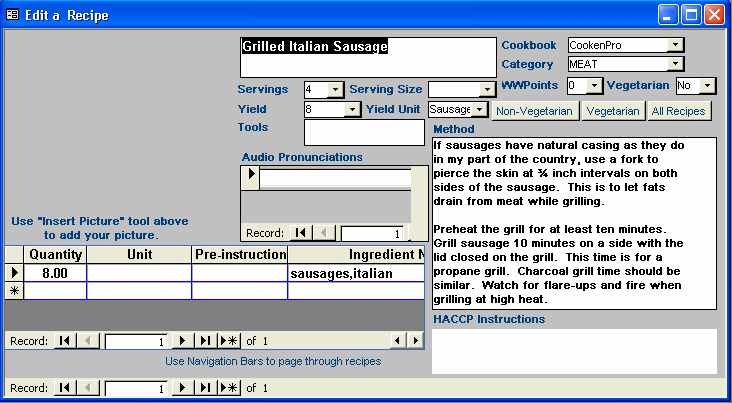
Click on the Enter A Recipe button on the Main Switchboard and you will be presented with a data entry screen. This screen has entry fields for the recipe name, what cookbook it came from, what category it will be stored in and even how many Weightwatcher points the recipe carries. There is also a data entry field for the number of servings and the serving size. Enter the method of preparation and other pertinent information about the recipe. Then save the record in the database.
Find A Recipe brings up a box that lists all of the cookbooks that are listed in the program and the categories for each. Click on the cookbook and category needed and then click on the OK button. This will bring up a grid listing of all the recipes that fell within the area of your request. Point your mouse to an entry and double click on it to view a recipe.
Edit A Recipe brings up box like in Find A Recipe. Make your selection and this time a data entry screen will appear. Make your changes and then save the record. Export A Recipe and Import A Recipe can be done in a couple of easy steps. Exporting a recipe can be done in the CookenPro or Meal-Master formats. The formats that are accepted for importing a recipe are Meal-Master, MasterCook and Accuchef along with CookenPro.
Make Recipes WebReady simply exports a recipe into an html format.
Find A Menu lets you choose from menus that have already been established. Plan A Menu lets you choose recipes from the different cookbooks in your database. You can make up an inventory list for the menu and change the number of servings. Choose which meal it is; dinner, lunch, breakfast or snacks. You can also add special instructions for this menu such as extra things needed for table settings or even guests who might be attending the meal.
You can make up a cookbook based on the entries in your database and print them out.
The Inventory is a whole other sub path for the program. Here you can create an inventory item, generate a purchase order, enter an invoice and keep track of physical inventory. You can generate various reports based on inventory items. This will be extremely helpful if you are running a catering business and will be using CookenPro 3 to monitor your inventory process.
CookenPro 3 Commercial Version has a whole bunch of tools that will help a person to maintain inventory control, manage recipes and monitor costs for their food service business. The home version does just about the same things as the Commercial version with a few minor differences.
The Commercial Version retails for $ 299.95 whereas the Home version is at $ 32.95. There is a 30 Day evaluation unit of the Commercial version available for $ 9.95 or you can download the program demo for free to check it out.
If you are serious about maintaining a computerized inventory, menu and recipe solution for your business, then CookenPro 3.0 Commercial Version might be well worth looking at. If you think it’s a little too pricy, get the 30 day evaluation unit to see if the program is a good fit for your business needs.
You can get more information about CookenPro 3 at Barrington Software’s CookenPro web site. It can be found at www.cooken.com.
© 2003 Bruce E Von Stiers